
Last Updated on December 4, 2025 by Vlad
Quick Answer
Yes. Tourists should absolutely get a Suica or PASMO card because it makes trains, subways, and buses simple to use. It also works for vending machines, convenience stores, and lockers, which saves time every day. Either card works exactly the same way across Japan.
Short on Time? Read This
Quick summary for busy travellers:
- Get either Suica or PASMO (they’re identical)
- Buy at the airport when you arrive
- Load ¥3,000-5,000 to start (or ¥10,000 if you’re using trains daily)
- Works on trains, buses, subways across Japan
- Also works at convenience stores, vending machines, and lockers
- You still need separate tickets for Shinkansen and airport express trains
After 20+ years of visiting Japan, I can honestly say these little IC cards are one of the best travel innovations I’ve experienced anywhere in the world. Both my wife and I carry our PASMO cards everywhere when we’re in Japan, and I genuinely can’t imagine travelling there without one anymore.
What Are Suica and PASMO Cards?
Think of them as Japan’s version of London’s Oyster card or Melbourne’s Myki Opal – prepaid IC (integrated circuit) cards that you tap on and off trains, buses, and subways. BUT – here’s where it gets better: you can also use them to pay at convenience stores, vending machines, lockers, and tens of thousands of shops across Japan. They your myki-debit card all in one.
Load some cash onto the card, tap it at ticket gates, and you’re done. No fumbling with ticket machines trying to work out complicated fare charts. No stressing about whether you bought the right ticket. Just tap and go.
Is Suica Still Sold? (Dec 2025 Update)
Short answer: Yes, Suica and PASMO cards are back and available again.
You might have read about the IC card shortage that hit Japan in 2023-2024. Due to a global semiconductor chip shortage, both Suica and PASMO cards became nearly impossible to buy for a while. Many blogs and forums still have outdated information saying they’re unavailable.
But as of 2025, the shortage is over. Both cards are widely available at:
- Tokyo airports (Narita and Haneda)
- Major train stations throughout Tokyo
- Ticket vending machines at JR and private railway stations
The Welcome Suica (the tourist version) remained available throughout the shortage, and now regular Suica and PASMO cards are back in stock too. So don’t worry – you’ll have no trouble getting one when you arrive.
Suica vs PASMO: Which One Should You Get?
Here’s the honest truth: it doesn’t really matter. They’re almost identical.
Comparison Table
| Feature | Suica | PASMO |
|---|---|---|
| Issuer | JR East (Japan Railways) | Private railway companies |
| Tourist version | Welcome Suica (no deposit, expires 28 days) | None (standard card only) |
| Deposit | ¥500 (refundable) | ¥500 (refundable) |
| Digital option | Yes (Apple Wallet, Welcome Suica Mobile app) | Yes (Apple Wallet only) |
| Works in other cities | Yes | Yes |
| Valid for | 10 years from last use | 10 years from last use |
| Card colour | Green | Pink |
Suica is issued by JR East (Japan Railways) and comes in that iconic green colour. PASMO is issued by private railway companies and has a pinkish design. But functionally? They work exactly the same way and are accepted on the same trains, buses, and shops throughout Japan.
I’ve used both over the years (currently carry a PASMO card that’s about 8 years old, as does my better half), and the only real difference is the colour. Pick whichever one you can get your hands on first – seriously, don’t overthink this.
The key differences that might matter:
- Suica has the Welcome Suica version specifically for tourists (expires after 28 days, no deposit required)
- PASMO doesn’t have a tourist-specific version, but their standard card works the same way
- Both require a ¥500 deposit (refundable when you return the card, though most people keep them as souvenirs)
- Both can be topped up at the same machines and shops
💡 Pro tip: Most tourists never bother returning their cards for the refund. They make brilliant souvenirs and they’re valid for 10 years, so just keep it for your next trip to Japan (like I do).
Physical Card vs Digital: What’s Best for Tourists?
This is where opinions get a bit personal. Both options work well, but here’s my take after trying both:
Physical Cards (Suica or PASMO)
The good stuff:
- Never runs out of battery (your phone can die, your card won’t)
- Works everywhere without fuss
- Makes a great souvenir
- Kids can have their own cards
- No setup hassle – buy it, load it, use it
- Less risk of dropping your phone at busy ticket gates
The not-so-good:
- One more thing to carry
- Can be lost (though rarely an issue)
- Requires cash only to top up at machines
My personal take: I still prefer physical cards. I’ve actually installed the Welcome Suica app to test it out, but I’m not a fan of that 180-day expiry limit. Plus, I’m not keen on waving my phone around at ticket gates – I drop things from time to time (cough, cough), and the last thing I want is to fumble my phone at Shibuya’s insanely busy ticket gates during rush hour.
And here’s the kicker: I’ve drained my phone battery empty more times than I’d like to admit. Google Maps is a hungry beast, and when you’re snapping photos and taking videos all day, your battery disappears fast. Having a physical card that works regardless of your phone’s battery situation? That’s peace of mind. Both my wife and I carry our PASMO cards everywhere when we’re in Japan – they’re compact, reliable, and never need charging.
Digital Versions (Apple Wallet or Google Pay)
The good news for phone-lovers: you can now add Suica or PASMO to your Apple Wallet or Google Pay.
The good stuff:
- Nothing extra to carry
- Top up with your credit/debit card anytime
- Can’t leave it behind in a hotel room
- Reload on the go without finding a machine
The not-so-good:
- Your phone needs battery (this is actually a bigger deal than you think – Google Maps and constant photo-taking will kill your battery faster than you expect)
- Setup can be finicky for some international cards
- Not everyone wants to wave their expensive phone at every turnstile
- Risk of dropping your phone at busy ticket gates (trust me, Shibuya Station during rush hour is not the place to be fumbling with your phone)
- Some Google Pay options only work with Japanese phones
Digital Options Explained
Regular Suica/PASMO on Apple Wallet:
- Works on iPhone 8 or newer, Apple Watch Series 3+
- Straightforward setup through Apple Wallet app
- Top up using Apple Pay
- No expiry date
- Most reliable digital option
Welcome Suica Mobile App:
- Launched March 2025
- Device requirements: iPhone XR/XS or later (iOS 17.2+), Apple Watch Series 3+
- Can only be activated in Australia, Singapore, Malaysia, Taiwan, Vietnam, South Korea, or Japan
- Balance expires after 180 days (deal-breaker for regular visitors)
- Extra features: buy 1-day travel passes, ride certain Shinkansen lines without separate tickets
- Registration can be frustrating
Google Pay (Android):
- Only works with phones sold in Japan
- Not practical for international tourists
The digital reality: The Welcome Suica Mobile app launched in March 2025, and I installed it myself to give it a proper go. Honestly? It’s had some teething problems. The registration process can be frustrating, and it only works in certain countries. The 180-day expiry is also a deal-breaker if you visit Japan regularly – who wants to set it up fresh every time?
If you’re keen on digital, adding a regular Suica to Apple Wallet seems more reliable than the Welcome Suica app. But I’m a physical card person through and through – both my wife and I stick with our trusty PASMO cards and have never felt the need to switch permanently to digital.
Where to Buy Physical Cards
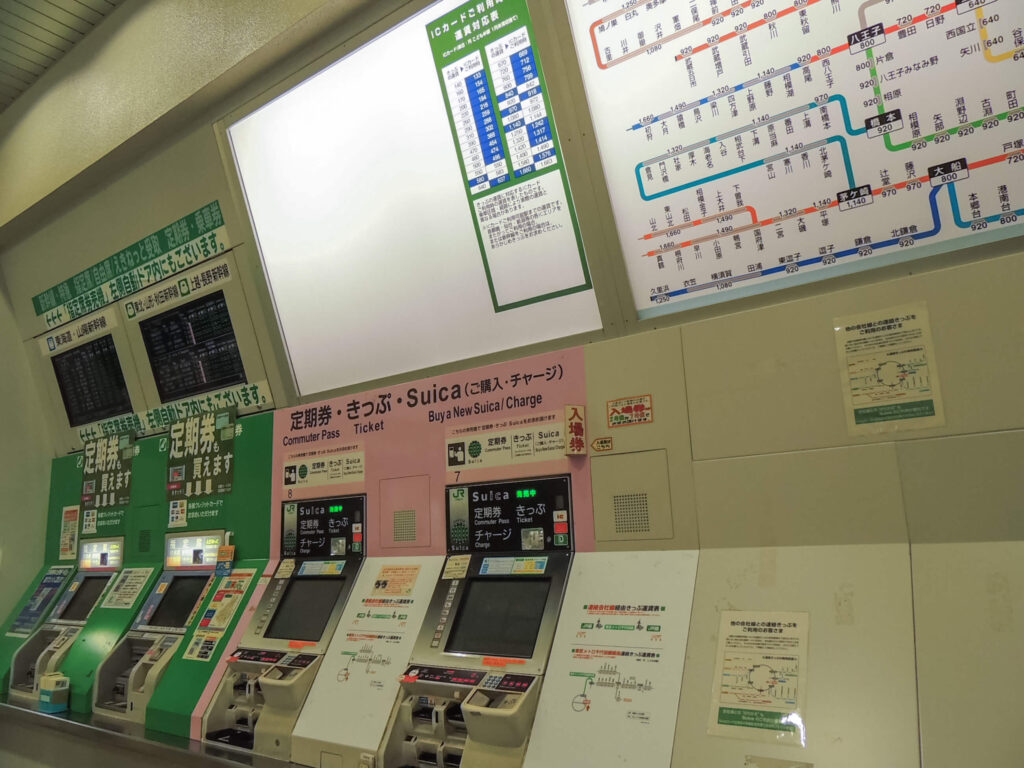
At the Airport (Easiest Option)
Both Narita and Haneda airports sell Suica cards:
Narita Airport:
- All three terminals have JR East Travel Service Centers
- Ticket vending machines available
- Usually longer queues than Haneda
Haneda Airport:
- Terminal 3 (international arrivals) has Welcome Suica machines and service counters
- Typically shorter queues than major train stations
- More convenient if you’re landing here
I usually grab mine at Haneda because the lines are typically shorter than at major train stations, and it’s one less thing to worry about when you arrive in Tokyo.
At Train Stations
Nearly every JR station in Tokyo has ticket machines that sell Suica cards. Look for machines with “Suica” written at the top. If you can’t find one or get confused, just ask at the ticket office – staff are incredibly helpful, and many speak English.
For PASMO cards, buy them at:
- Private railway stations (Tokyo Metro, Toei Subway, Keio, Tokyu, Odakyu, etc.)
- Most ticket machines at these stations
💡 Pro tip: If you’re staying in Yokohama or using private railways frequently, grab a PASMO card. If you’re mostly using JR lines, get a Suica. But honestly, either works perfectly fine everywhere.
How Much Do They Cost?
Cards come preloaded with ¥1,000, ¥2,000, ¥3,000, ¥4,000, ¥5,000, or ¥10,000. This includes a ¥500 deposit that you’ll get back (minus a small handling fee) if you return the card before leaving Japan.
The Welcome Suica has no deposit but can’t be refunded.
How to Use Your Card (It’s Dead Simple)
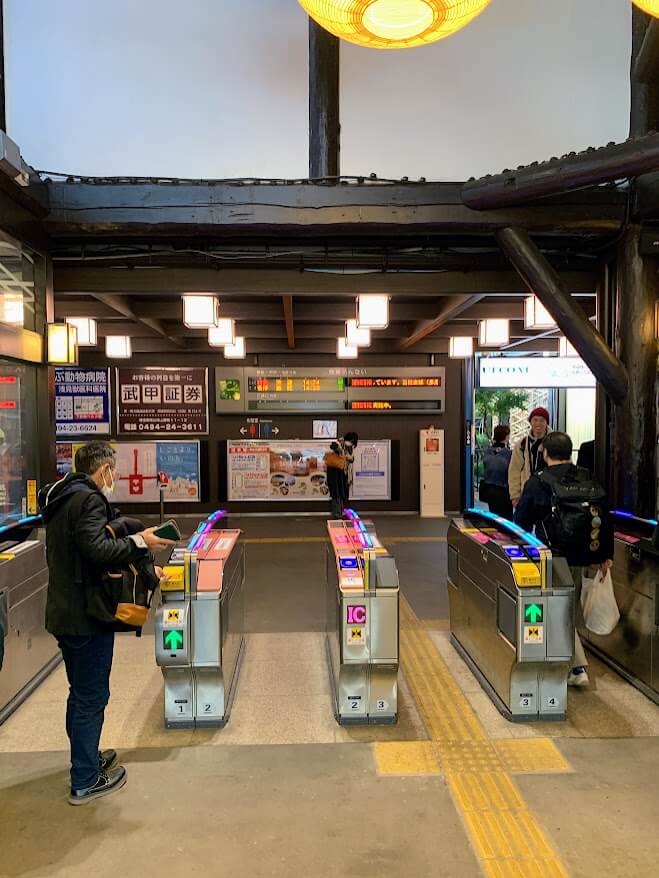
On Trains and Subways
- Find the ticket gates (they’re unmissable)
- Tap your card on the IC card reader (it’s usually on top of the gate, glows blue)
- Walk through when the gates open
- Tap again when you exit
The screen will show your remaining balance. If you don’t have enough money for your trip, the gate won’t open – just find a fare adjustment machine nearby (always inside the gates) and top up your card.
Real talk: I’ve accidentally walked through ticket gates with my wallet instead of taking out my card, and it still worked because the reader picked up the IC card through my wallet. But don’t do this if you have multiple IC cards – it’ll get confused and reject you. Ask me how I know…
💡 Pro tip: Always keep at least ¥1,000 on your card to avoid getting stuck at exit gates.
On Buses
Buses are a bit more variable:
- Flat fare buses (like Tokyo’s Toei buses): Tap once when you get on or off (depending on the bus)
- Distance-based fare buses: Tap when you get on AND when you get off
Look for the IC card reader near the driver. It’s usually pretty obvious.
True story: I’ve charged my PASMO countless times on buses. You just need to tell the driver and insert cash into the machine.
Use Suica/PASMO at Shops, Vending Machines, and Lockers


This is where these cards become genuinely magical. Look for these logos:
- The green Suica penguin
- The pink PASMO symbol
- The brown and red “IC” symbol
You’ll find them at:
- All convenience stores (7-Eleven, FamilyMart, Lawson)
- Many restaurants and cafes
- Ramen ordering machines (not all)
- Coin lockers
- Vending machines (not all, but many)
- Purchasing tickets and rides at certain attractions (i did my son’s pony ride at Kodomonokuni)
- Some shops and department stores
Just tap your card on the reader, wait for the beep, and you’re done. No PIN, no signature, no fuss.
Why I love this: Late-night convenience store runs with exact change are a pain. Being able to tap my PASMO for a quick snack or a cold Yebisu Beer is brilliant. Also, vending machines in Japan are everywhere, and many don’t take larger notes – using your IC card solves this instantly.
💡 Pro tip: You can use Suica/PASMO for coin lockers at stations – perfect for storing luggage while you explore.
How to Top Up Your Card (Super Easy)
There are three main ways to add money to your physical card:
1. Ticket Machines at Stations
The most common way. Look for any ticket machine (they’re everywhere):
- Pop your card on the reader
- Hit the English button (usually top right corner)
- Select how much you want to add (¥1,000 increments)
- Feed in your cash (cash still rules in Japan)
- Grab your card
Takes about 30 seconds. The machines are available 24/7 wherever there are ticket gates.

2. Convenience Stores
Even easier. Just hand your card to the staff and say “Charge please” (or “チャージ” if you want to try your Japanese). They’ll ask how much, you hand over the cash, and they’ll reload it right there. Works at 7-Eleven, FamilyMart, and Lawson.
I do this more often than using machines because there’s never a queue.
3. Fare Adjustment Machines
If you’re already inside the ticket gates and realize you’re short on credit, look for fare adjustment machines (usually near the regular ticket machines). Same process as the ticket machines, just located on the inside.
How Much Money Should You Load?
Important note: Most machines only accept cash for top-ups. If your card is in Apple Wallet, you can top up using Apple Pay anytime from your phone – super convenient.
This really depends on how much you’ll be using trains and buses. I personally load ¥10,000 on my PASMO because I use it every single day – trains and buses around Yokohama, trips into Tokyo, vending machines, convenience stores, the works. It gives me plenty of buffer and means I’m not constantly topping up.
For tourists who are using it less intensively, starting with ¥3,000-5,000 is probably fine. A typical train trip in Tokyo costs ¥200-500, so ¥5,000 gives you enough for several days of normal sightseeing. You can always top up as needed – better to start conservative than have unused credit sitting on your card.
💡 Pro tip: If you’re planning to use trains extensively (like visiting Hakone, Yokohama, or taking multiple day trips from Tokyo), consider loading ¥7,000-10,000 to save yourself frequent top-ups.
Where Can You Use These Cards?
The honest answer: pretty much everywhere that matters.
Transportation Coverage in Tokyo
Works on:
- All JR East lines
- All Tokyo Metro and Toei Subway lines
- Private railways (Keio, Odakyu, Tokyu, Seibu, Tobu, Keisei, Keikyu)
- City buses
- Tokyo Monorail to Haneda Airport
Beyond Tokyo
Your Suica or PASMO works in most major Japanese cities including:
- Osaka and Kyoto: ICOCA cards are local, but Suica/PASMO work fine
- Nagoya: TOICA and manaca cards are local
- Fukuoka: SUGOCA cards are local
- Sapporo
- Hiroshima
- Sendai
Basically, if there’s an IC card reader at the ticket gate, your card will work. The nationwide interoperability is brilliant – you can use your Tokyo card seamlessly in Osaka, Kyoto, or Fukuoka without any hassle.
Important Limitations (What Your Card Can’t Do)
You Can’t Travel Between Regions in One Journey
You can’t use it to ride from area to area without tapping out. For example, you can’t use your Suica to ride from Tokyo all the way to Osaka without breaking the journey. Each trip needs to start and end within the same IC card zone.
If you’re riding from Nagoya to Kyoto for example, you need to end your Suica ride at the edge of one area and restart at the next. Not a huge issue, but worth knowing.
Special Express Trains Need Separate Tickets
Your IC card covers the base fare, but limited express trains require extra tickets:
- Shinkansen (bullet trains) – definitely need separate tickets
- Narita Express (N’EX) to Narita Airport
- Skyliner to Narita Airport
- Haruka Express to Kansai International Airport
You can’t just tap through with your IC card for these trains. Buy your tickets separately (ordering online often gets you a discount).
Real experience: I learned this the hard way trying to use my PASMO for the Narita Express. The ticket gates rejected my card, and I had to sheepishly go buy a proper ticket. Now I know to book express train tickets in advance.
Is Suica cheaper than a JR Pass? It depends entirely on your itinerary. If you’re taking multiple long-distance Shinkansen trips (like Tokyo to Kyoto to Osaka), a JR Pass can save you serious money. But for just getting around Tokyo and day trips, Suica/PASMO is all you need and much cheaper.
Travelling with Kids: Should They Get Their Own Cards?
Yes, definitely. Kids aged 6-11 can get Child Suica or PASMO cards, which charge half-price fares. Kids under 6 travel free (up to two kids per adult).
What you need:
- Show ID proving your child’s age when buying a Child card
- These cards are personalized and can be reissued if lost (regular cards can’t)
- Valid until March 31 of the year they turn 12
The half-price fares add up quickly too – if you’re doing a week in Tokyo with kids, you’ll save a decent chunk of change compared to buying tickets or using adult cards.
💡 Pro tip for families: Get Child cards for kids 6-11. The savings are worth it, and it gives them independence at ticket gates.
Common Mistakes (And How to Avoid Them)
After countless trips using these cards, here are the most common stuff-ups I’ve seen (and made myself):
Forgetting to tap out: The gates won’t let you back in until you sort out your previous trip. Just find a staff member and they’ll fix it quickly. No drama.
Using the card with very low balance: If you have ¥50 left and try to take a ¥200 train ride, you’ll get stuck at the exit gates. Always keep at least ¥1,000 on your card.
Trying to use one card for multiple people: Each person needs their own card. The gates track individual entries and exits.
Expecting it to work on all buses: Some regional buses outside major cities still only take cash. Not common in Tokyo/Osaka/Kyoto, but it happens in rural areas.
Not checking if your card expired: Welcome Suica cards expire after 28 days of first use. Regular Suica/PASMO cards are valid for 10 years from the last transaction.
Tapping with multiple IC cards in your wallet: The reader gets confused. Take out the specific card you want to use.
Refunds and Leftover Balance: What to Do
At the end of your trip, you have a few options:
Keep Your Card (Most Popular Option)
Most people just keep their card as a souvenir. It’s valid for 10 years from your last top-up, so you can use it on your next trip to Japan. No need to return it or get a refund.
This is what I recommend unless you’re certain you’ll never return to Japan (which, let’s be honest, once you visit once you’ll want to go back).
Get a Refund
If you want to return your card and get your deposit back:
- Go to any JR ticket office (for Suica) or private railway office (for PASMO)
- Hand over your card
- You’ll get your ¥500 deposit back, plus any remaining balance
- Small handling fee (¥220) is deducted from remaining balance
Note: Welcome Suica cards can’t be refunded at all – they’re designed to be kept.
Worth knowing: If you have less than ¥220 remaining balance, it’s not worth the hassle of returning the card. Just keep it.
Why Do People Even Ask This Question?
If you’re reading this wondering “should I get a Suica card as a tourist?”, you’re not alone. This question exists because:
1. The 2023-2024 chip shortage confusion
Outdated blog posts and forums still say these cards are “unavailable” or “discontinued.” They’re not – the shortage ended in late 2024, and cards are now widely available again.
2. Digital card confusion
People aren’t sure if they should get a physical card or use their phone, and there’s conflicting information about which digital options work for international tourists.
3. Wondering if it’s worth it
Some tourists think buying individual tickets might be cheaper or easier. Spoiler: it’s not. The IC card saves you time and money on every single journey.
4. JR Pass comparison
People want to know if they should get a JR Pass instead. The truth? They serve different purposes. JR Pass is for long-distance travel (like Tokyo to Kyoto), while IC cards are for local trains, subways, and buses within cities.
The reality is simple: Yes, tourists should absolutely get a Suica or PASMO card. It makes your trip infinitely easier, works across the entire country, and you’ll use it dozens of times every day.
Final Verdict: Physical or Digital?
Here’s my honest recommendation after using both:
Get a Physical Card If You:
- Want zero hassle
- Are travelling with kids
- Don’t want to worry about phone battery
- Like having a souvenir
- Prefer not to add yet another app or digital wallet
- Visit Japan regularly (no expiry hassles)
Go Digital If You:
- Always keep your phone charged
- Don’t want to carry extra cards
- Want the convenience of reloading via credit card
- Are comfortable with digital wallets
- Don’t mind some initial setup faff
- Won’t visit Japan often (so the 180-day expiry doesn’t matter)
The Pragmatic Approach
Get a physical card when you arrive (it takes 5 minutes at the airport), and if you want to try the digital version, you can always set it up later for your next trip. That’s what I did – tried the Welcome Suica app once, decided it wasn’t for me, and went back to my reliable PASMO card.
Bottom Line
Whether you choose Suica or PASMO, physical or digital, getting one of these cards is absolutely worth it. They make getting around Japan ridiculously easy, and the convenience of using them for small purchases is genuinely brilliant.
I’ve travelled to over 40 countries, and Japan’s IC card system is hands-down the best public transport payment system I’ve ever used. Simple, fast, and it just works.
Pick one up when you land, load it with a few thousand yen, and you’ll wonder how you ever considered travelling Japan without one.
Frequently Asked Questions
Do tourists still need Suica in 2025?
Yes, absolutely. Despite the chip shortage in 2023-2024, Suica and PASMO cards are now widely available again. They’re still the easiest way to use trains, subways, and buses throughout Japan.
Can you get Suica on an iPhone?
Yes. iPhone 8 or newer can add Suica to Apple Wallet. There’s also the Welcome Suica Mobile app (requires iPhone XR/XS or later with iOS 17.2+), but the regular Apple Wallet Suica is more reliable in my experience.
Is Suica worth it for tourists?
Yes. You’ll save time on every journey (no ticket machines), save a bit of money (IC cards are slightly cheaper than tickets), and you can use it for shopping, vending machines, and lockers. The convenience alone makes it worth getting.
Does Suica work in Kyoto and Osaka?
Yes. Suica and PASMO work throughout Japan thanks to the nationwide IC card interoperability system. Kyoto and Osaka use ICOCA cards locally, but your Tokyo card works exactly the same way there.
Is Suica cheaper than a JR Pass?
They serve different purposes. Suica/PASMO is for local trains, subways, and buses (¥200-500 per trip). A JR Pass costs ¥50,000+ but gives unlimited long-distance JR travel including Shinkansen. If you’re just exploring Tokyo and maybe one or two day trips, Suica is way cheaper. If you’re doing Tokyo-Kyoto-Osaka-Hiroshima, get a JR Pass.
How does Suica work?
Load money onto the card (minimum ¥1,000), tap it on the IC card reader when entering ticket gates, tap again when exiting. The fare is automatically calculated and deducted. You can top up at any ticket machine or convenience store when your balance runs low.
Where can I buy a Suica card in Tokyo?
At Narita Airport (all terminals), Haneda Airport (Terminal 3), and virtually every JR East station throughout Tokyo. Look for ticket vending machines with “Suica” written at the top, or ask at the ticket office.
Can two people use the same Suica card?
No. Each person needs their own card because the system tracks individual entries and exits. If two people try to use one card, the exit gate will reject it.
Quick Checklist for Your Trip
- ✅ Buy your card at the airport or first train station
- ✅ Load it with at least ¥3,000 to start (more if you’re using trains daily)
- ✅ Tap in and out at every gate
- ✅ Use it at convenience stores for easy shopping
- ✅ Top up whenever you’re below ¥1,000
- ✅ Keep it for your next trip to Japan
Trust me, you’ll use this card more than any other thing you bring to Japan except your phone and passport.
Related articles you might find helpful:
- Best Day Trips from Tokyo – Where to use your IC card for adventures
- Yokohama with Kids: Best Things to Do – Using your card around Yokohama
- JR Pass Calculator – Work out if you need a JR Pass too
- 10 Day Japan Essentials Itinerary – Perfect for first-time visitors